
How to add staff to your shop
Invite a manager, cashier or stock keeper. Each role only sees what it needs. Requires Pro or Business.
Reviewed 17 November 2026. Screenshots are examples; written steps reflect current prices and plan limits.
⏱ 2 min📍 Dashboard → Team
1Invite
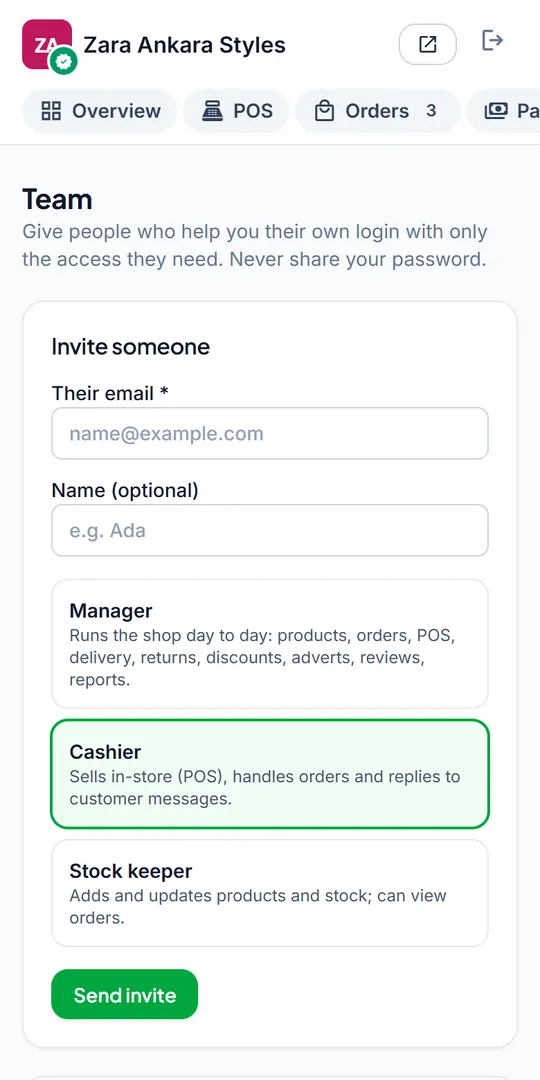
Pro includes 2 staff accounts; Business includes 10. In Team enter their email, choose a role and send an invite. Free does not include staff access.
2Roles
A manager helps run the shop; a cashier uses the POS and orders but can't see bank details; a stock keeper manages products and stock.
3Remove access
Remove a member any time; they lose access immediately.
Want every step on one page?
⬇ Seller guide (PDF) Updated 17 Nov 2026More guides
Still stuck? Contact the Kaya 9ja Retails team