
How to set delivery fees, pickup and pay on delivery
Delivery zones and fees, free delivery above an amount, pickup, pay on delivery and time slots.
Reviewed 17 November 2026. Screenshots are examples; written steps reflect current prices and plan limits.
⏱ 4 min📍 Dashboard → Delivery
1Open Delivery
In your dashboard tap Delivery. The top shows what customers will see right now.
2Add delivery zones
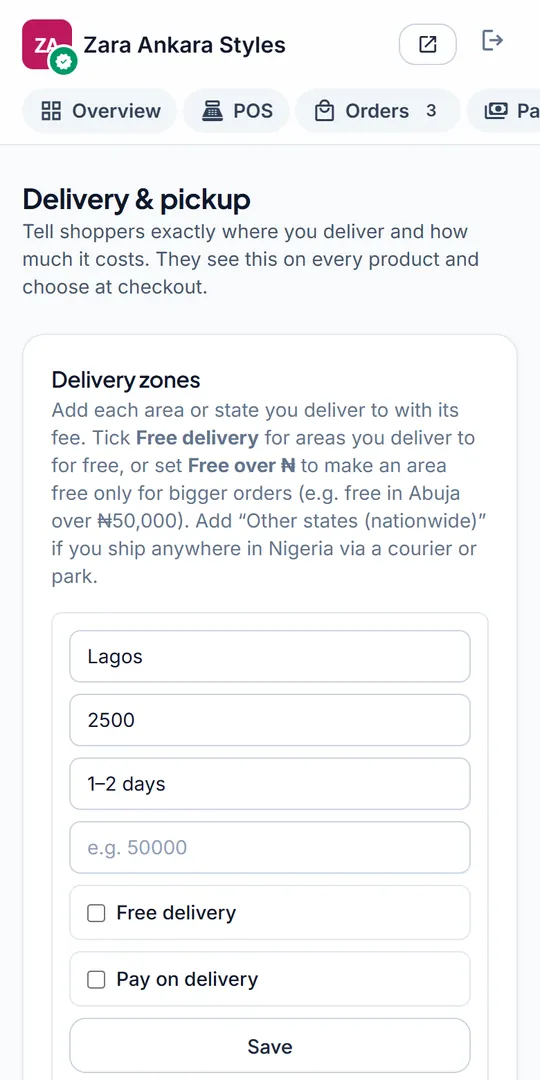
Under Delivery zones tap Add a zone. Pick an area or state (e.g. Lagos Mainland, Abuja (FCT), Other states (nationwide)), the fee and the delivery time.
3Free delivery (optional)
Set Free over ₦ for a zone, and delivery to that area becomes free once the order reaches that amount.
4Pay on delivery (optional)
Tick “Customers in this area can pay when the order arrives” for zones where you accept it, and set an order limit if bigger orders must be paid by transfer first.
5Pickup
Tick “Customers can pick up orders (free)” and add pickup details. You can also let customers pay when they collect.
6Delivery days & time slots (optional)
Choose the days you don't deliver and the time slots customers can book.
Want every step on one page?
⬇ Seller guide (PDF) Updated 17 Nov 2026More guides
Still stuck? Contact the Kaya 9ja Retails team