
How to pay the seller and upload your receipt
Pay the seller directly by transfer, then upload proof so they can confirm.
Reviewed 17 November 2026. Screenshots are examples; written steps reflect current prices and plan limits.
⏱ 2 min
Prefer to watch? How to shop on Kaya 9ja Retails: order from Nigerian shops and pay the seller directly (1:45)
1Transfer the exact amount
On your order page you see the seller's bank, account number, account name and the amount. Transfer exactly that amount from your bank app. Use the order number as the narration.
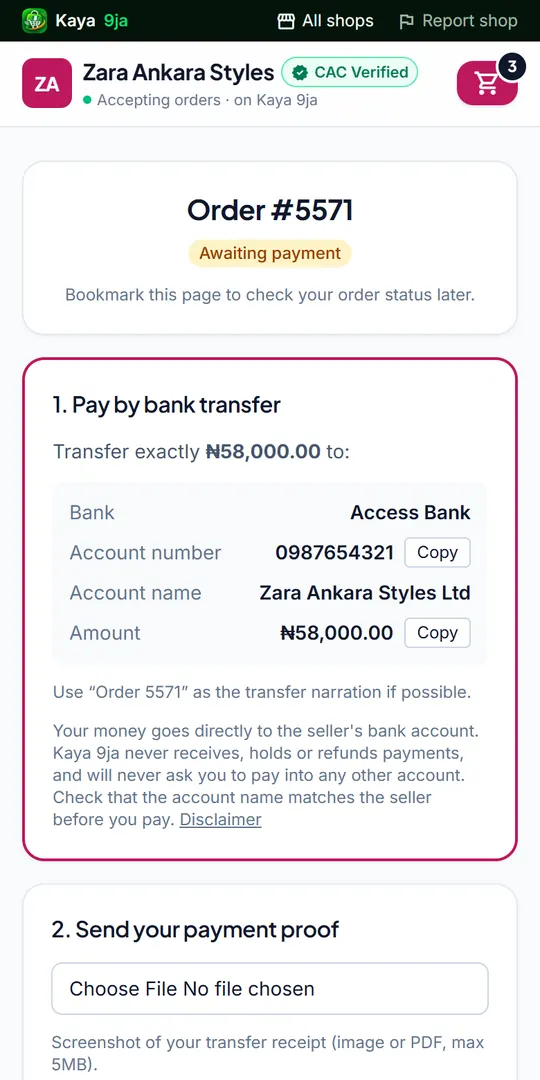
2Upload your receipt
Upload a screenshot or PDF of the transfer under “Send your payment proof”. The seller is told immediately.
3Wait for confirmation
The seller checks their account and confirms. Your order page updates.
💡 Tips
- Kaya 9ja Retails never holds your money and will never ask you to pay into any other account.
- Check that the account name matches the shop before you pay.
- Some shops accept card payments or pay on delivery: you'll see the option at checkout.
Want every step on one page?
⬇ Shopper guide (PDF) Updated 17 Nov 2026More guides
Still stuck? Contact the Kaya 9ja Retails team